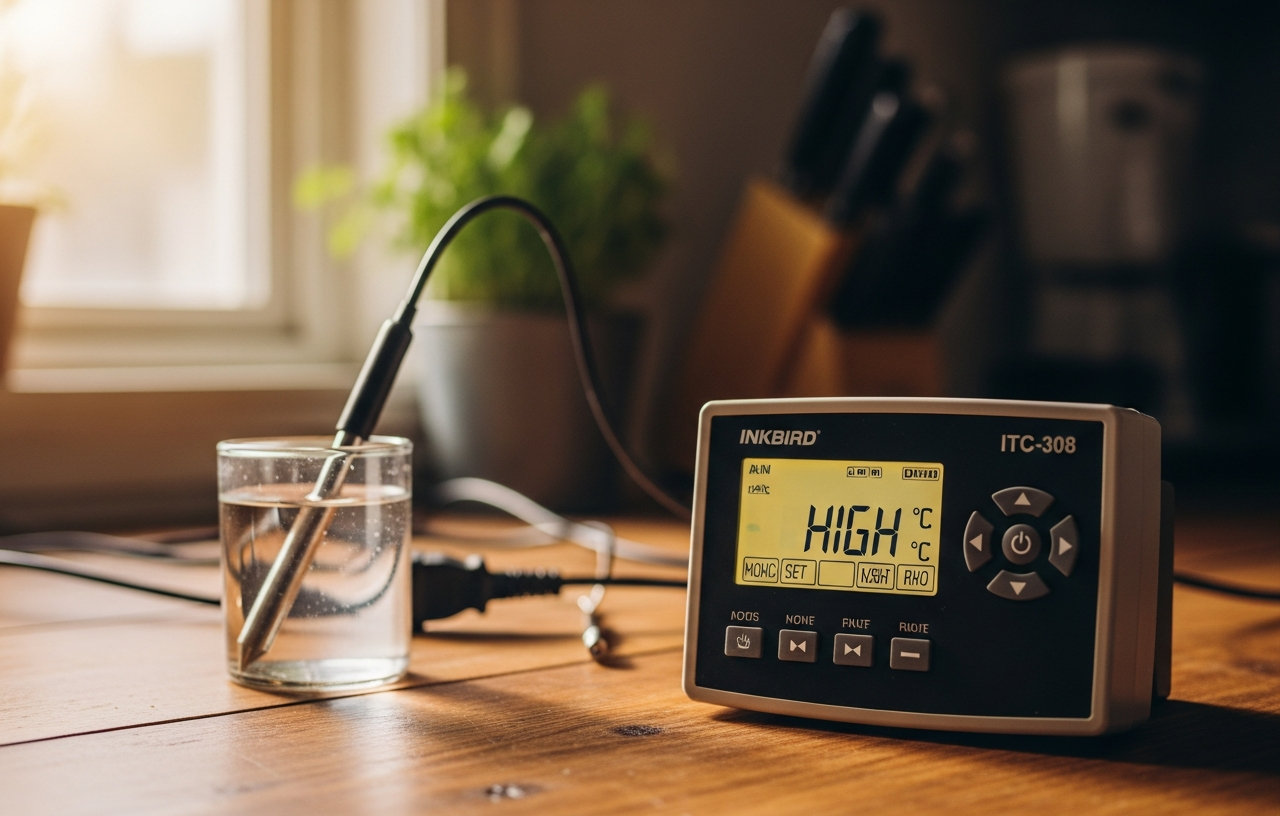

Inkbird ITC-308 Digital Temperature Controller 2-Stage Outlet Thermostat Heating and Cooling Mode Carboy Homebrew Fermenter
- Supports °C/°F display.
- Able to power refrigeration and heating equipment as conditions change.
- Displays measured temperature and set temperature at the same time.
- High and low temperature alarms are available when the temperature is over or the sensor experiences a.
A rapidly rising temperature displayed on your Inkbird ITC-308, especially when your fermentation chamber should be cooling, signals a problem. This issue can jeopardize your homebrew, leading to off-flavors or a stuck fermentation. Understanding why your Inkbird ITC-308 shows a temperature higher than expected, or fails to activate cooling, helps you protect your batch. This guide details the common culprits and provides specific steps to get your fermentation back on track.
Temperature control is vital for successful brewing, winemaking, and kombucha production. The Inkbird ITC-308 Digital Temperature Controller 2-Stage Outlet Thermostat Heating and Cooling Mode Carboy Homebrew Fermenter is a popular tool for home brewers. It supports both Celsius and Fahrenheit displays and can power refrigeration and heating equipment as conditions change. It also displays the measured temperature and your set temperature simultaneously. If it indicates a high temperature, start by systematically checking the components of your setup.
Sensor Probe Placement and Condition
The most frequent cause of inaccurate temperature readings or unexpected high temperatures on your Inkbird ITC-308 is the sensor probe itself. Its placement and condition directly impact the accuracy of the displayed temperature.
Incorrect Probe Placement
The probe needs to measure the actual temperature of your fermenting liquid, not the ambient air. If the probe hangs freely in the air within your fermentation chamber, it will read the air temperature, which can fluctuate wildly and may not reflect the wort or must temperature. Place the probe directly into the liquid. A common method involves taping the probe to the side of your fermentation vessel, then insulating it with a piece of foam or bubble wrap. This insulation helps the probe read the liquid temperature more accurately, minimizing the influence of ambient air.
Damaged or Faulty Probe
Inspect the probe wire for any visible damage, such as kinks, cuts, or corrosion. Even small nicks can compromise the probe's accuracy. Water ingress into the probe tip can also cause erratic readings. If you suspect damage, testing with a known accurate thermometer can confirm if the Inkbird probe is reading correctly. Unplug the Inkbird, carefully remove the probe, and examine it. Replacement probes are available and generally inexpensive. A new probe can often resolve persistent high temperature readings if the old one is compromised.
Probe Calibration
Over time, or sometimes out of the box, temperature probes can drift slightly. The Inkbird ITC-308 has a calibration function (AC parameter) which allows you to adjust the displayed temperature by a small offset. To check if calibration is needed, place the Inkbird probe and a trusted, calibrated thermometer into a glass of ice water (it should read 0°C or 32°F) or warm water. Compare the readings. If there's a consistent difference, adjust the AC parameter on your Inkbird to match the trusted thermometer. Refer to your Inkbird manual for specific steps to access and change this setting.
Heating or Cooling Equipment Malfunction
The Inkbird controller only tells your heating or cooling device when to turn on and off. If the device itself is not responding correctly, your fermentation temperature will drift. The Inkbird ITC-308 is specifically designed to manage both heating and cooling equipment, making it a versatile tool for maintaining ideal fermentation temperatures.
Heater Stuck On
If you are using a heating element (like a fermentation wrap or heat mat) and the temperature is too high, the heater might be stuck on. Unplug the heater from the Inkbird's heating outlet and check if it cools down. Some heaters have their own internal thermostats that could fail, causing them to constantly apply heat. If the heater is always warm when plugged directly into a wall outlet, it is faulty and needs replacement.
Cooling Device Not Activating or Ineffective
Conversely, if your refrigerator or freezer is not cooling, the Inkbird will continue to show a high temperature and try to activate cooling without success. Make sure the cooling appliance is plugged into the Inkbird's cooling outlet. Check if the cooling appliance is receiving power by plugging it directly into a wall outlet. Listen for the compressor to kick on. If the appliance does not cool, it may have a mechanical issue. Repairing a refrigerator or freezer can range from $100-$300 for minor issues to $400-$800 for compressor problems, not including the service call fee of $80-$150. Consider the cost of a new appliance versus repair, especially for older units. You can learn more about building a fermentation chamber in our article on Best Fermentation Temperature Controllers.
Inkbird ITC-308 Settings Configuration
Incorrect settings on your Inkbird ITC-308 can lead to temperature overshoot or underperformance, resulting in a temperature that is consistently too high.
Heating and Cooling Differential (HD/CD)
The differential settings (HD for heating, CD for cooling) determine how far the temperature can drift from your set point before the controller activates the heating or cooling device. If your differential is set too low (e.g., 0.1°F), the controller might cycle the equipment on and off too frequently, leading to wear. If it is set too high, your temperature might overshoot significantly before the controller reacts. For most homebrewing, a differential of 1-2°F (0.5-1°C) is suitable. Experiment to find the sweet spot for your specific setup. A larger differential allows for more temperature fluctuation but reduces equipment cycling.
Compressor Delay (PT)
The Compressor Delay (PT) setting is specifically for cooling units like refrigerators and freezers. It prevents the compressor from restarting too quickly after turning off, which can damage the compressor. A common setting is 3-5 minutes. If this setting is too short, your cooling unit might struggle or fail to cool effectively, leading to higher temperatures. If the Inkbird attempts to cool but the compressor does not engage, check this setting. A delay setting that is too long will allow the temperature to climb higher before cooling activates, which might appear as a consistently high reading.
Environmental Factors and Insulation
The environment surrounding your fermentation chamber significantly affects how well your Inkbird ITC-308 and cooling/heating equipment perform.
Ambient Room Temperature
If your fermentation chamber is in a very warm room, your cooling unit will work harder and may struggle to maintain the desired temperature. High ambient temperatures can cause the Inkbird to display a constantly high temperature, as the cooling unit cannot keep up. Consider moving your setup to a cooler location or adding insulation to your fermentation chamber. Proper insulation helps maintain stable temperatures, reducing the workload on your heating and cooling equipment. For beginners setting up their first system, managing ambient temperature is a key consideration, as detailed in guides like Best Homebrew Starter Kits: Top Picks for First-Time Brewers.
Fermentation Chamber Insulation
A poorly insulated fermentation chamber (like an old, leaky refrigerator or a thin plastic tote) will lose cold air or heat quickly. This forces your Inkbird to constantly activate the cooling or heating element, potentially leading to temperature fluctuations and higher energy consumption. Add rigid foam insulation to the interior walls, door, and top of your chamber to improve efficiency. Seal any gaps or cracks with weather stripping. This simple upgrade can make a big difference in temperature stability and accuracy.
Exothermic Fermentation Activity
Yeast activity during fermentation generates heat. This is an exothermic reaction, meaning it releases energy in the form of heat. During the most active phase of fermentation (often days 2-5 for ale yeast), the internal temperature of your wort can be several degrees Fahrenheit higher than the ambient temperature in your fermentation chamber.
If your Inkbird probe is taped to the outside of the vessel, it might not fully capture this internal heat. The Inkbird will then try to cool the chamber more aggressively than needed, or it might show a higher temperature than your set point because the liquid itself is naturally warmer. This phenomenon is why some brewers place the probe directly into the fermenting liquid via a thermowell. This ensures the Inkbird reacts to the actual temperature of the beer or wine. Understanding the fermentation process, including phenomena like What is Krausen? Explaining Its Role in Brewing, helps in anticipating these temperature shifts.
When to Call a Professional
Most Inkbird ITC-308 issues are solvable with basic troubleshooting steps. However, some problems warrant professional attention:
- Persistent Electrical Issues: If you suspect a wiring problem within the Inkbird unit itself, or if it consistently trips circuit breakers, it is best to consult an electrician. Electrical work can be dangerous without proper training. An electrician's service call typically costs $80-$150, with repairs ranging from $100-$400 depending on complexity.
- Major Appliance Failure: If your refrigerator or freezer is not cooling despite being plugged into a functioning outlet, and the Inkbird is correctly set, the appliance itself likely needs repair. As mentioned, appliance repair costs can be substantial.
- Unexplained Malfunctions: If you have exhausted all troubleshooting steps and your Inkbird ITC-308 still displays erratic temperatures or fails to control your equipment, and you have replaced the probe, the unit itself might be faulty. In this case, contacting Inkbird customer support for warranty service or considering a replacement Inkbird ITC-308 is the next step.
Final Checks and Maintenance
Before concluding, perform a few final checks. Make sure all connections are secure. Unplug and re-plug the Inkbird, cooling, and heating devices to reset any minor glitches. Regularly clean your fermentation chamber and ensure proper airflow around your cooling unit. Keeping your equipment clean and well maintained helps prevent many common issues. A properly functioning Inkbird ITC-308 is an invaluable asset for any home brewer or fermenter, ensuring your creations develop at their optimal temperature.
Inkbird ITC-308 Digital Temperature Controller 2-Stage Outlet Thermostat Heating and Cooling Mode Carboy Homebrew Fermenter
- Supports °C/°F display.
- Able to power refrigeration and heating equipment as conditions change.
- Displays measured temperature and set temperature at the same time.
- High and low temperature alarms are available when the temperature is over or the sensor experiences a.